内饰,局部细节特写图片的清洗
内饰图片,虽然具有火车特征但是和外部照片差距过大,试图用一个模型去 handle 泛化似乎不太可能。加之许多车辆内饰都采用高度相似的风格设计,例如 JR 东日本的 E217-E231-E233-E235 系列(尽管有微小差别),甚至蔓延到了新潟地区用车 E129。虽然不在目前的 scope,但是阪急电铁的车内内饰也高度统一,如此试图区分车辆种类不太划算。加之,DINO 的车辆判断下会把车辆内饰作为特征判定为一整个火车,所以必须滤除这个部分。
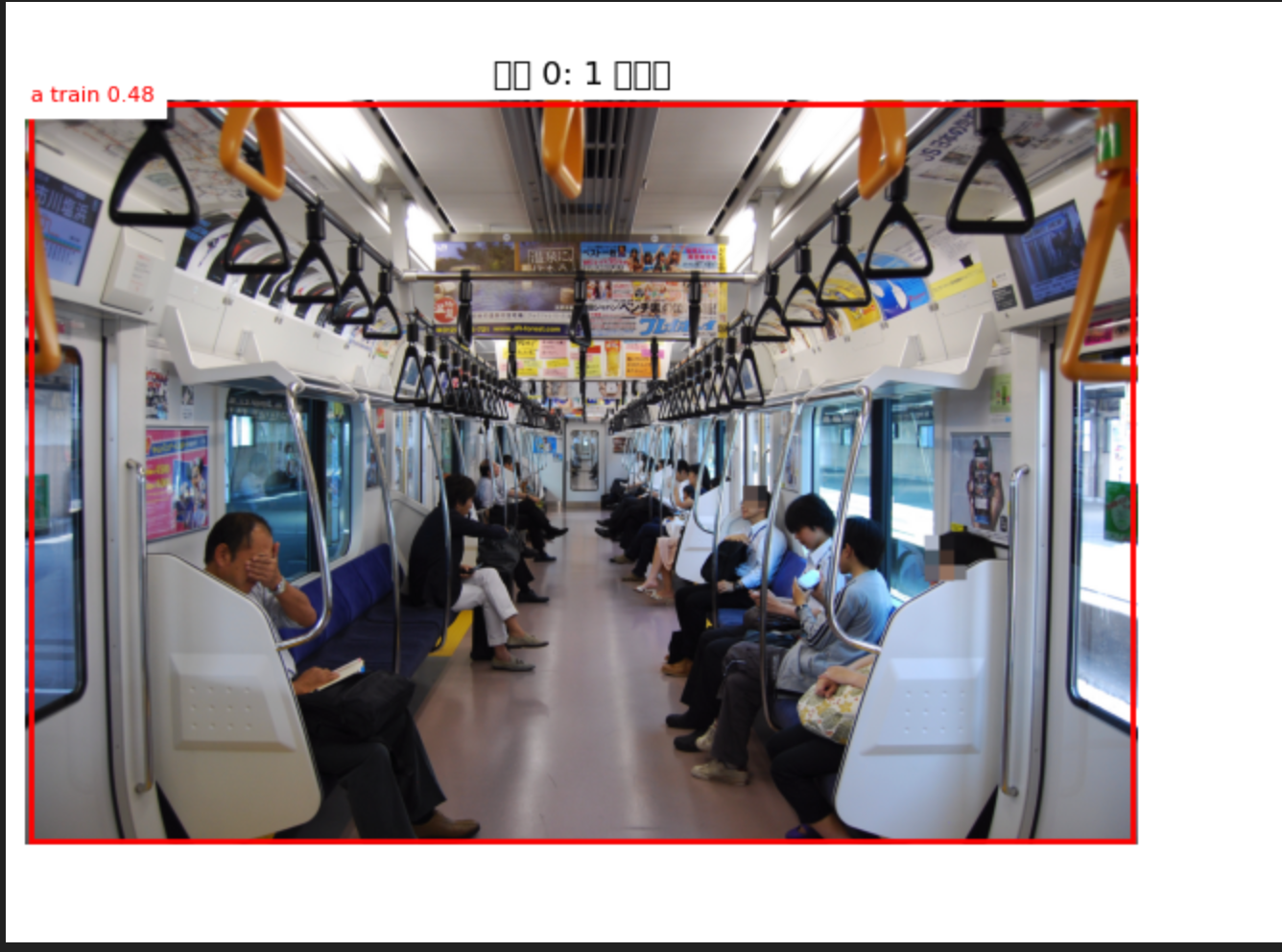
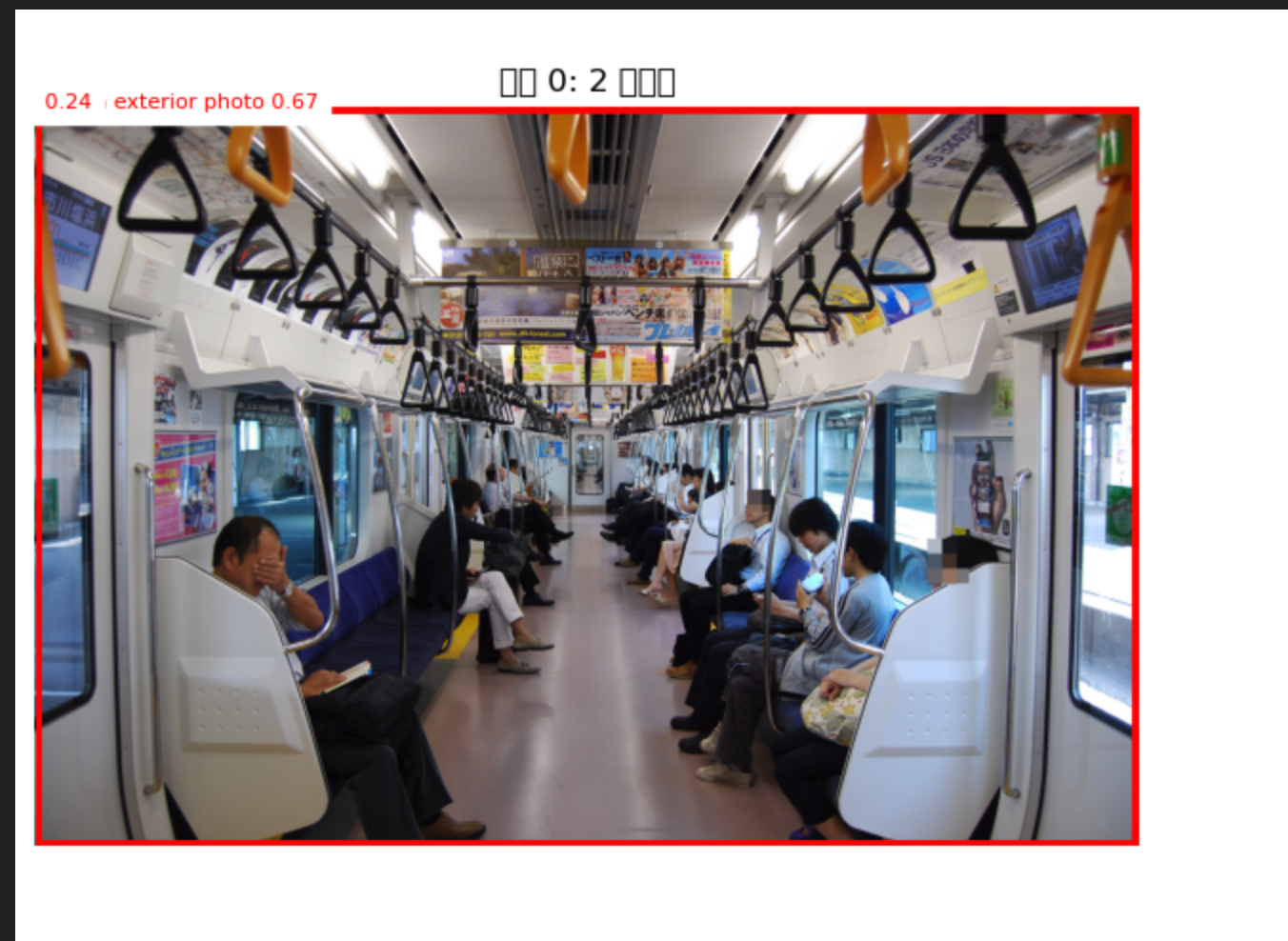
之后试图用 Grounding DINO 寻找 boundary box 进行 Zero-shot 的多列车识别,发现 Grounding DINO 在未微调的情况下语义上无法细微区分机车,动车组,车辆内部与外部,在训练中可能 train 标签也泛化到了内饰,导致如果内饰图片进入就完全无法检测数量。所以有必要严格去掉所有的内饰图。
不过实践最后采用了一个非常取巧的设计。在前一个笔记本中我已经根据能想到的关键词大概写了一个粗略过滤:
 1
 2
 3
 4
 5
 6
 7
 8
 9
10
11
12
13
14
| FILE_EXCLUDE_PATTERNS = (
"interior", "inside", "seat", "seats", "seating", "reclining", "free-space",
"cab", "cockpit", "toilet", "wc", "route map", "counter", "merchandising counter",
"display", "lcd", "vvvf", "logo", "air cleaner", "antenna", "pantograph",
"camera", "accident", "syanai", "車内", "運転台", "運転室", "トイレ", "便所","カメラ", "事故", "車内",
"trainchannel",
"運転台", "運転室", "トイレ", "便所",
"洗面所", "洗面台", "モニター", "カウンター", "停車駅案内", "案内表示器",
"パンタグラフ", "エアクリーナー", "集電装置", "エアコン", "クーラー",
)
CATEGORY_EXCLUDE_PATTERNS = (
"interior", "inside", "parts", "seats", "information display", "mockup","green car"
)
|
上述的关键词,在文件名和 category 两个尺度下做了过滤,已经显著减少透过来的图片了,不过还有许多细节,例如可能座椅吊环等细节,还有台车等位置无法纳入。所以在后面又加上了 LLM 过滤。
 1
 2
 3
 4
 5
 6
 7
 8
 9
10
| from openai import OpenAI
client = OpenAI()
SYSTEM_PROMPT_excluding = """
你是一个日本铁路图片分类助手,通过Wikipedia Commons图片的分类路径来判断图片所属铁路车辆的类别信息。请在必要时通过web_search查找相关信息辅助判断,不要随意猜测。
你将会收到每张图片的文件名以及其category_path(一个字符串列表,表示图片在Wikipedia Commons上的分类路径)。请根据这些信息判断图片是车辆整体照片还是内部照片或细节照片,例如显示屏,驾驶位,厕所等。
请在文件名或category_path中寻找明确信号,若无法判断则默认不排除。
请为每个图片输出一个JSON对象,给你的一个batch请将他们的结果输出为一个JSON数组。请保持图片的ID不变输出。每个JSON对象的格式如下:
{"id":<图片ID>, "exclude": <是否排除,0表示不排除,1表示排除>, "reason": <如果排除请给出理由,在interior, detail之间选择一个。>}
"""
|
发送请求和断点续传逻辑省略。考虑到任务非常简单,使用了 gpt-5.4-mini,并试图令其使用网络搜索;虽然这个代码在替换过程中被改掉了,但是在没有网络搜索的情况下,依然超出预期,能够通过台车型号过滤掉局部照片。
 1
 2
 3
 4
 5
 6
 7
 8
 9
10
11
12
13
14
15
16
17
18
19
20
| def request_exclude_batch(batch_str: str) -> list[dict]:
"""Call the LLM for one batch and retry when the output is not valid JSON."""
last_error = None
for attempt in range(1, MAX_LLM_RETRIES + 1):
response = client.responses.create(
model=OPENAI_MODEL_NAME,
input=[
{"role": "system", "content": SYSTEM_PROMPT_excluding},
{"role": "user", "content": batch_str},
],
reasoning={"effort": "low"},
)
try:
return parse_llm_json_array(response.output_text)
except (json.JSONDecodeError, ValueError) as exc:
last_error = exc
print(f"JSON parse failed ({attempt}/{MAX_LLM_RETRIES}): {exc}")
print((response.output_text or "")[:500])
time.sleep(1)
raise RuntimeError(f"LLM JSON parse failed after retries: {last_error}")
|
其实正常应该在 API 调用处加上 tools=[{"type": "web_search"}],不过发现没有居然也有较好的表现。因为没有 Ground Truth 没法测试召回率,我们会试图在后面继续解决这个问题。不过通过随机抽样依旧能发现有绿车内部图片进入,可能是在文件名上也完全没有提示信息。
这里要使用对比学习语义对齐更强的模型,例如 CLIP。由于是非常粗的二分法,所以只需要其语义理解能力即可,不需要细粒度。除此之外可以使用其更强的版本,SigLIP-2。我们会在之后回到这个问题上。
LLM 格式化处理车型,番台,特殊编成,涂装,运营公司
这部分依旧比较适合交给 LLM,因为它处理的不是图片画面,而是 Wikipedia Commons 的 category path 中带有的语义元数据。相同叶节点下的图片通常共享同一个 category path,因此只需要对唯一的 path 做一次结构化抽取,再把结果回写到所有同 path 图片即可。
 1
 2
 3
 4
 5
 6
 7
 8
 9
10
11
12
13
14
15
16
17
18
19
20
21
22
23
24
25
26
27
| DETAIL_COLS = ["submodel", "bandai", "operator_en", "operator_jp", "special_formation", "special_livery"]
DETAILS_CSV = os.path.join(PROJECT_ROOT, "data", "llm_category_details.csv")
if "llm_details" in locals():
details_df = llm_details.copy()
else:
details_df = pd.read_csv(DETAILS_CSV)
def sql_null(v):
"""Coerce empty/sentinel strings to None so SQLite stores NULL."""
if pd.isna(v):
return None
v = str(v).strip()
return None if v.lower() in {"", "nan", "none", "null"} else v
details_df[DETAIL_COLS] = details_df[DETAIL_COLS].map(sql_null)
with sqlite3.connect(db_path) as conn:
existing = {row[1] for row in conn.execute("PRAGMA table_info(images)")}
for col in DETAIL_COLS:
if col not in existing:
conn.execute(f"ALTER TABLE images ADD COLUMN {col} TEXT")
set_clause = ", ".join(f"{col} = ?" for col in DETAIL_COLS)
update_rows = details_df[DETAIL_COLS + ["category_path_json"]].values.tolist()
conn.executemany(f"UPDATE images SET {set_clause} WHERE category_path_json = ?", update_rows)
conn.commit()
|
有几个 trick。set_clause 进行了动态展开,最后的语句比较类似:
1
2
3
4
5
6
7
8
9
| UPDATE images
SET
submodel = ?,
bandai = ?,
operator_en = ?,
operator_jp = ?,
special_formation = ?,
special_livery = ?
WHERE category_path_json = ?;
|
这样既防注入,又只需要修改最上面的 list 就能修改需要插入的字段。然后使用 conn.executemany(sql, update_rows),不需要逐条循环写入。
Grounding DINO 进行车辆对象数量判断及 Boundary Box 生成
Grounding DINO 作为基于 Transformer 的 detector 模型,可以提供由 Transformer 架构带来的文本引导能力,所以可以直接给出一个个体描述,例如 "a train" 就可以让它进行侦测,并输出 boundary box 和 confidence。但是比起 VLM 来说,它没有 ViT 再 concat 文字 prompt 的过程,也就少了很多幻觉或者遮挡问题。当然也如最开始提到,语义引导做不到 zero-shot 细粒度,所以去掉内饰图片就很重要了。
 1
 2
 3
 4
 5
 6
 7
 8
 9
10
11
12
13
14
15
16
17
18
19
20
21
22
23
24
25
26
27
28
29
30
31
32
| model_id = "IDEA-Research/grounding-dino-base"
device = Accelerator().device
processor = AutoProcessor.from_pretrained(model_id)
model = AutoModelForZeroShotObjectDetection.from_pretrained(model_id).to(device)
SAMPLE_SIZE = 6
with sqlite3.connect(db_path) as conn:
sample_images = pd.read_sql_query(
f"""
SELECT id, downloaded_path
FROM images
WHERE excluded = 0
AND download_status = 'downloaded'
ORDER BY RANDOM()
LIMIT {SAMPLE_SIZE}
""",
conn,
)
paths = [os.path.join(PROJECT_ROOT, "data", p) for p in sample_images["downloaded_path"]]
images = [Image.open(path) for path in paths]
text_labels = [["a train"]] * len(images)
inputs = processor(
images=images,
text=text_labels,
return_tensors="pt",
padding=True,
).to(device)
with torch.no_grad():
outputs = model(**inputs)
|
之后需要一些后处理,例如 PIL.Image.size 是 (width, height),而 target_sizes 需要 (height, width)。后处理阶段会把模型内部的归一化坐标还原回原始图片尺寸:
1
2
3
4
5
6
7
8
9
| target_sizes = [img.size[::-1] for img in images]
results = processor.post_process_grounded_object_detection(
outputs,
inputs.input_ids,
threshold=0.2,
text_threshold=0.3,
target_sizes=target_sizes,
)
|
结果来看识别主体还是非常准的,不过被遮挡就比较微妙:
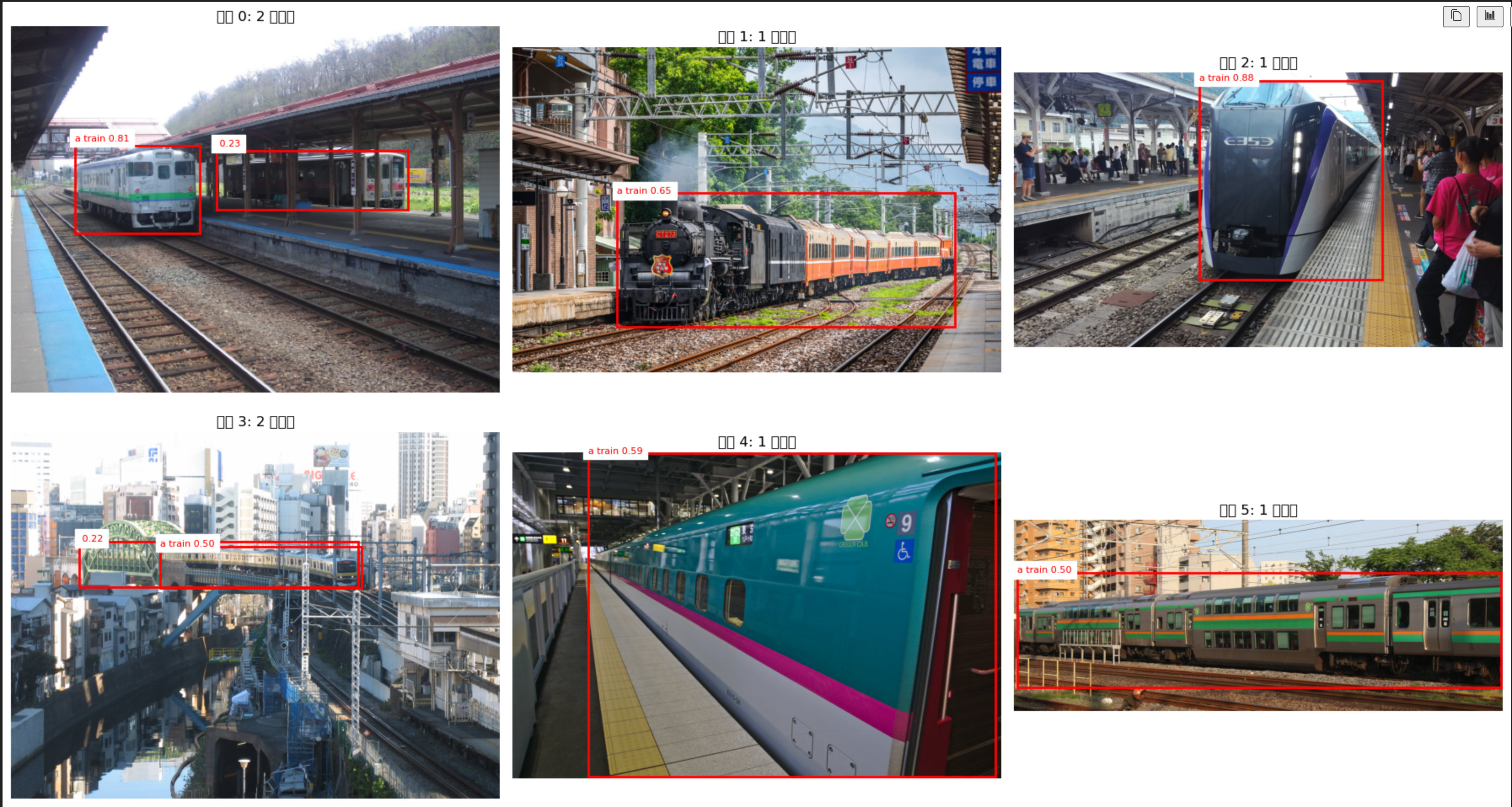
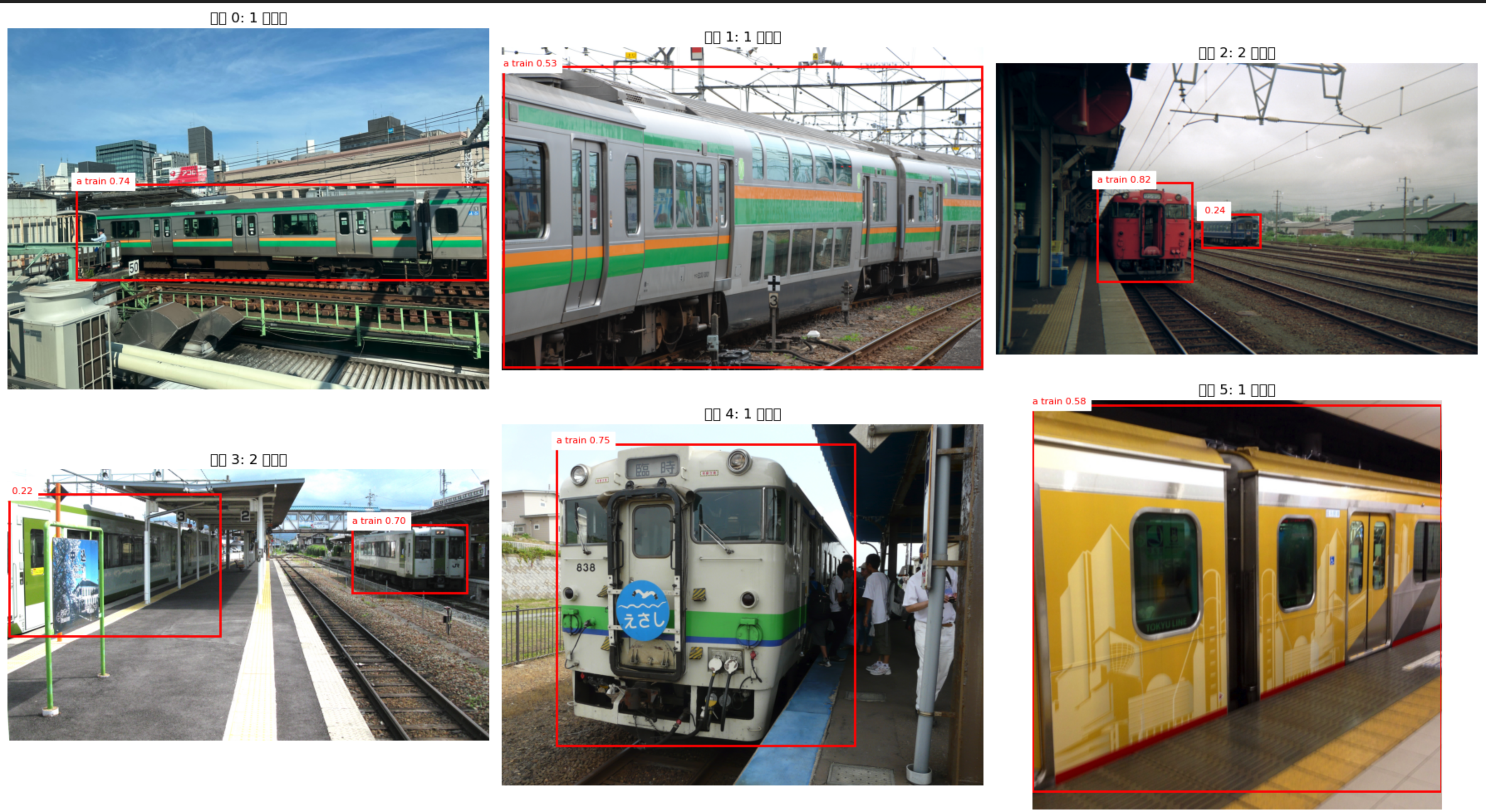
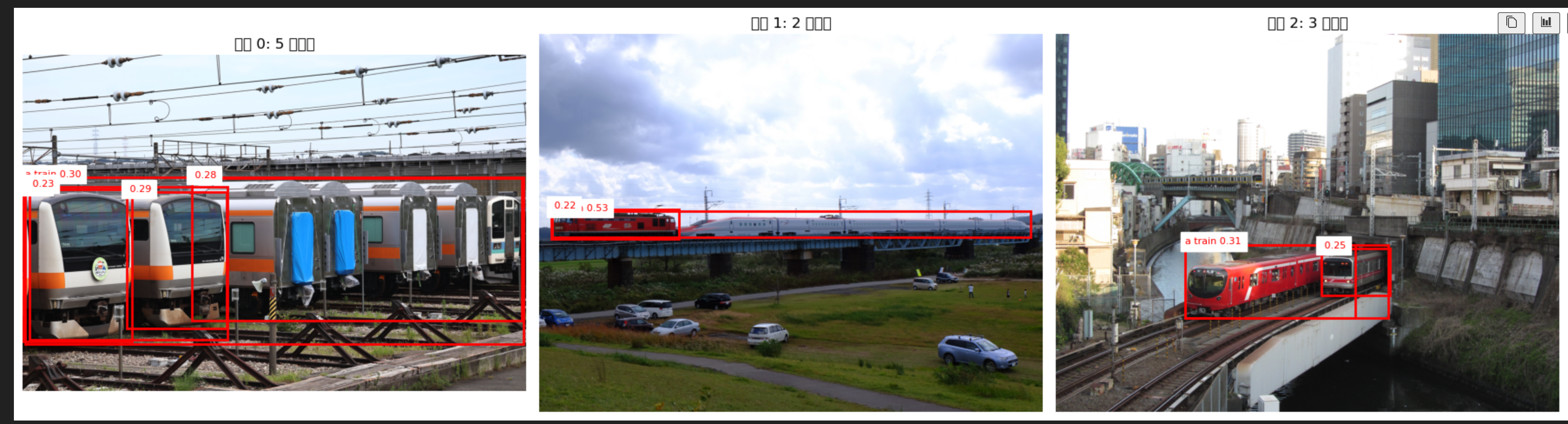
然后专门弄点多车辆的图来看看,特别对于连结的表现比较微妙,后面可能以此为基础判断之后,采用从样本中 few-shot 交叉检测的方式,看看能不能抓出真正的主体,或判断是否保留过滤。对于连结 BBox 重复的问题,可以继续尝试 NMS 去重。
从 v1 到 v2:把画面过滤交给 SigLIP2
今天的主要调整是把“图片画面类型”的判断从 LLM 流程里拆出来。LLM 仍然适合处理 category path 中的结构化语义,例如番台、特殊涂装、运营公司;但它并不能真正看见图片,因此对“绿车内部”“座椅局部”“车端连接细节”这种没有明确文件名提示的样本,最终还是会漏。 不过目前发现SigLIP2仍然会漏掉一些外部细节和内饰,特别是他似乎没法判断非常模糊的所谓”细节“,例如外部方向幕。这个还需要研究
所以 v2 笔记本改成了一个更清晰的职责划分:
- 文件名和 category path 规则只做保守的内饰关键词过滤。
- LLM 不再判断
interior / exterior / detail。 - SigLIP2 直接对图片本体做 zero-shot 画面分类。
- Grounding DINO 只在过滤后的候选外观图上做车辆主体检测和 bbox 生成。
当前使用的 SigLIP2 模型是:
1
2
3
4
5
6
| checkpoint = "google/siglip2-base-patch16-512"
image_classifier = pipeline(
model=checkpoint,
task="zero-shot-image-classification",
use_fast=True,
)
|
候选标签被压缩成三类:
 1
 2
 3
 4
 5
 6
 7
 8
 9
10
11
12
13
14
15
| SIGLIP_VIEW_CANDIDATES = [
"an image of the interior of a train",
"an image of the exterior view of a train",
"an image of a detailed close-up of the exterior part of a train",
]
prompt_to_label = {
"an image of the interior of a train": "interior",
"interior": "interior",
"an image of the exterior view of a train": "exterior",
"exterior": "exterior",
"an image of a detailed close-up of the exterior part of a train": "detailed",
"detailed": "detailed",
"uncertain": "uncertain",
}
|
这里选择纯 SigLIP2,而不是继续让 LLM 通过 path 判断,是因为这一步的问题本质上是视觉语义对齐,而不是文本元数据清洗。文件名或 category path 里出现 seat、interior、wc 时当然可以用规则直接处理;但当一张图只叫 E231 series at ...,实际内容却是车内座椅时,规则和 LLM 都没有足够信息。SigLIP2 至少能从图像本身给出一个统一的 zero-shot 分数。
规则过滤也随之收缩,只保留明显内饰相关关键词,不再把受电弓、logo、空调、车号等外部细节一并规则过滤。原因是外部细节边界很模糊:有些局部图对后续细粒度学习没有价值,有些车头、连结器、前照灯、涂装细节反而可能有用。因此这些外部细节先交给 SigLIP2 和后续检测步骤处理。
 1
 2
 3
 4
 5
 6
 7
 8
 9
10
11
12
13
14
| INTERIOR_KEYWORD_PATTERNS = (
"interior", "inside", "seat", "seats", "seating", "reclining", "free-space",
"cab", "cockpit", "toilet", "wc", "route map", "display", "lcd", "syanai",
"車内", "運転台", "運転室", "トイレ", "便所",
"洗面所", "洗面台", "停車駅案内", "案内表示器", "モニター",
)
def match_interior_keyword(*texts: str | None) -> str | None:
"""Return a normalized interior reason when obvious interior metadata is found."""
haystack = " ".join(text or "" for text in texts).lower()
for pattern in INTERIOR_KEYWORD_PATTERNS:
if pattern.lower() in haystack:
return "interior"
return None
|
这里还有一个小的数据库清理:旧流程留下的 exclude_reason 中存在 llm:、file:、category: 这样的前缀。v2 中不再把 reason 当成来源追踪字段,而是只保留归一化后的技术原因,例如 interior、detailed、exterior。因此增加了一次性清理 cell,把 wc、display、seat 等细碎原因统一并入 interior。
 1
 2
 3
 4
 5
 6
 7
 8
 9
10
11
12
13
14
15
16
17
18
19
20
21
22
23
24
25
26
27
28
29
30
31
32
33
| conn.execute(
"""
UPDATE images
SET exclude_reason = TRIM(
REPLACE(
REPLACE(
REPLACE(exclude_reason, 'llm:', ''),
'file:', ''
),
'category:', ''
)
)
WHERE exclude_reason IS NOT NULL
AND (
exclude_reason LIKE 'llm:%'
OR exclude_reason LIKE 'file:%'
OR exclude_reason LIKE 'category:%'
)
"""
)
conn.execute(
"""
UPDATE images
SET exclude_reason = 'interior'
WHERE exclude_reason IN (
'inside', 'seat', 'seats', 'seating', 'reclining', 'free-space',
'cab', 'cockpit', 'toilet', 'wc', 'route map', 'display', 'lcd', 'syanai',
'車内', '運転台', '運転室', 'トイレ', '便所',
'洗面所', '洗面台', '停車駅案内', '案内表示器', 'モニター'
)
"""
)
|
SigLIP2 的结果写回数据库时,也从循环构造处理每行的数据再 conn.execute(...) 改成了先构造 update_rows,再一次性 executemany(...)。这类批量写入对 SQLite 很重要,尤其是后续全量图片规模继续上升时,减少 Python 层循环内的SQL操作次数比较重要。唯一的问题是当之后 图片数量大量上升时一次性构造完将产生大量垃圾中间变量,对内存冲击较大。不过这个问题对整个pipeline都很显著,所以之后实验完毕迁移到脚本文件时基本都需要写盘中间文件然后分batch处理。
 1
 2
 3
 4
 5
 6
 7
 8
 9
10
11
12
13
14
15
16
17
18
19
20
21
| update_rows = []
for img_path, result in zip(paths, outputs):
top_result = siglip_top_filtered_to_label(result)
label = top_result["label"]
exclude = 0 if label in {"interior", "uncertain"} else 1
exclude_reason = None if exclude == 0 else label
update_rows.append((exclude, exclude_reason, img_path))
with sqlite3.connect(db_path) as conn:
conn.executemany(
"""
UPDATE images
SET excluded = ?,
exclude_reason = ?
WHERE downloaded_path = ?
""",
update_rows,
)
conn.commit()
|
这一段仍然是实验中的写回策略,SigLIP2 的三类视觉结果已经可以写回数据库,不过为了 保持数据集自己的开放特性留下标签 后续可以根据下游任务决定保留外景整体、排除内饰、或把外部细节单独送入人工验证。
Manifest 级别的 MIME 过滤
在爬取 Commons manifest 后,还增加了一个更早的过滤点:直接在数据库里删除 MIME 不是图片的文件。不如说忘了为什么现在才做这个东西,结果下下来一堆ogg音频啥的其他页面资源。这个位置比下载阶段更合理;如果它们已经进入 manifest,后面每一步都要额外处理异常,而且还很占我的硬盘。这些就没什么好说的,直接杀掉整条entry。
因此在 img_crawler.ipynb 中增加了 manifest 入库后的清理逻辑:
 1
 2
 3
 4
 5
 6
 7
 8
 9
10
11
12
13
14
15
16
17
18
| def purge_non_image_manifest_records(conn: sqlite3.Connection) -> int:
"""Remove manifest rows whose MIME type is not an image."""
non_image_ids = [
row[0]
for row in conn.execute(
"""
SELECT id
FROM images
WHERE LOWER(COALESCE(mime, '')) NOT LIKE 'image/%'
"""
)
]
if not non_image_ids:
return 0
conn.executemany("DELETE FROM image_categories WHERE image_id = ?", [(i,) for i in non_image_ids])
conn.executemany("DELETE FROM images WHERE id = ?", [(i,) for i in non_image_ids])
return len(non_image_ids)
|
因为这是返回pipeline前端进行的,所以这个设计还有一个好处:过滤逻辑直接作用在数据库,而不是只作用在当前 DataFrame。所以不仅可以幂等执行而且不需要中间变量,符合上面提到的真正的pipeline设计思路
为什么必须引入 power_type
Grounding DINO 的第一个实验只使用 "a train",对动车组、普通列车整体照比较自然,但对机车会出现语义粒度不足的问题。机车既是 train 的一部分,又可以作为独立 locomotive 被识别;如果 prompt 只有 "a train",模型在机辆编组、连结、站场多车场景里容易把整组、局部车辆和机车主体混在一起。
如果全用train识别对象的效果(以及由于前面内饰没清洗干净的后果):
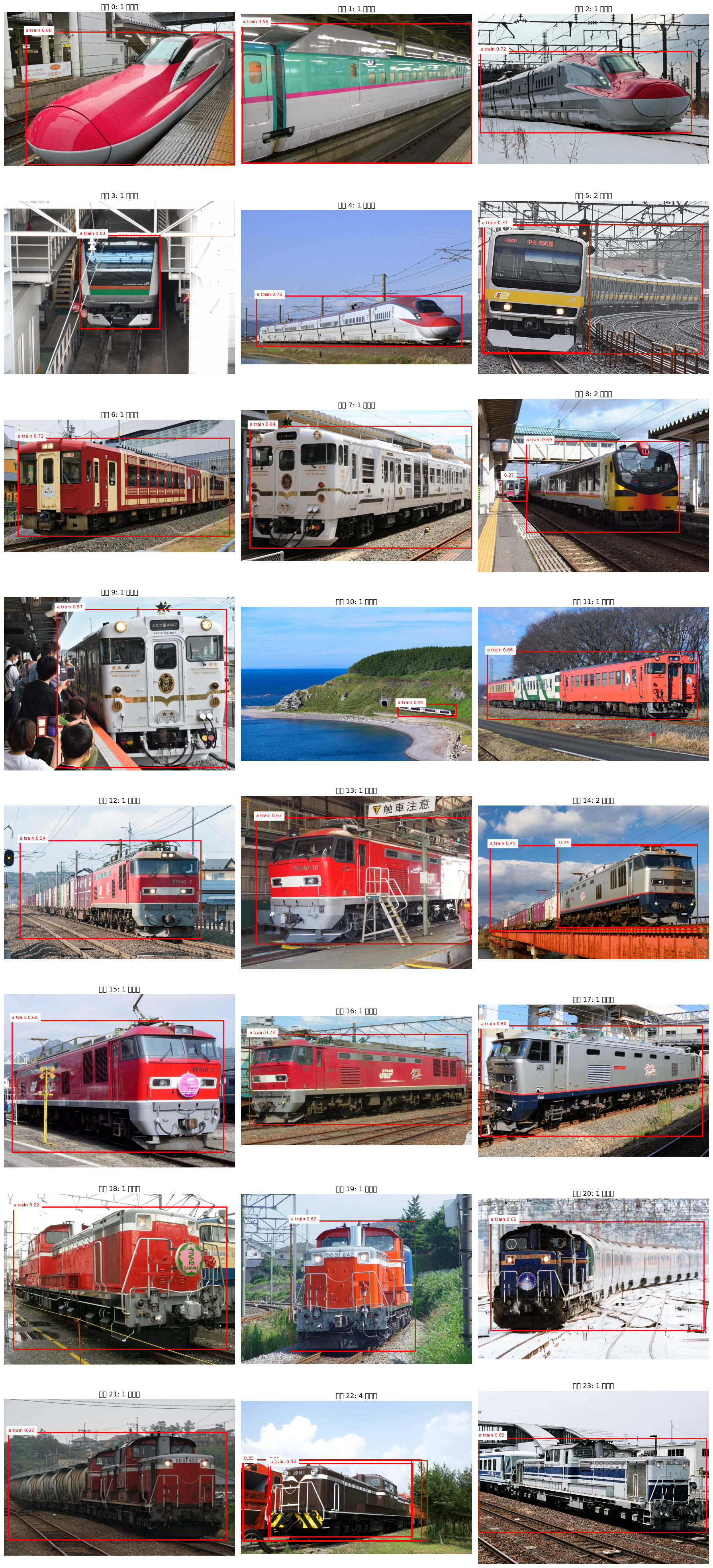
因此今天引入了 power_type 字段,用来区分:
EMUDMUElectric LocomotiveDiesel LocomotiveSteam LocomotiveElectro-diesel Multiple Unit
Electro-diesel Multiple Unit最后这个是双模车,只有E001四季岛。但是不确定后面其他公司的掺合进来会不会产生新的,所以这个也要实时更新。
原始数据里已经有日文的 type 字段,例如 電車、気動車、電気機関車,所以这里不需要 LLM 判断。规则映射更可控,也更容易保证幂等。
 1
 2
 3
 4
 5
 6
 7
 8
 9
10
11
12
13
14
15
| POWER_TYPE_MAP = {
"電車": "EMU",
"新幹線電車": "EMU",
"気動車": "DMU",
"電気機関車": "Electric Locomotive",
"ディーゼル機関車": "Diesel Locomotive",
"蒸気機関車": "Steam Locomotive",
"電気・ディーゼル両用(EDC方式)車両": "Electro-diesel Multiple Unit",
}
def map_power_type(type_value: str | None) -> str | None:
"""Map the Japanese rolling-stock type into the English power type taxonomy."""
if pd.isna(type_value):
return None
return POWER_TYPE_MAP.get(str(type_value).strip())
|
这个字段被加到了两个位置:
- 导出的
jr_east_freight_series_wiki_commons.csv - SQLite 的
images 表
为了兼容已有数据库,初始化函数里也加入了 migration:
1
2
| if "power_type" not in image_columns:
conn.execute("ALTER TABLE images ADD COLUMN power_type TEXT")
|
之后在构造 image records 时,把车型级别的 power_type 随每张图片一起写入:
1
2
3
4
5
6
| record = {
"series": row["series"],
"wiki_title": row["wiki_title"],
"power_type": None if pd.isna(row.get("power_type")) else row.get("power_type"),
...
}
|
对应的 upsert 也加入 power_type=excluded.power_type,保证后续重复爬取、增量更新、修正 CSV 映射时都能刷新数据库。
旧数据库则通过一次性修复 cell 补齐:
 1
 2
 3
 4
 5
 6
 7
 8
 9
10
11
12
13
14
15
16
17
18
19
20
21
22
23
24
25
26
27
28
29
| def repair_image_power_type_from_series(
db_path: str = IMAGE_DB_PATH,
model_csv: str = COMMONS_MODEL_CSV,
) -> pd.DataFrame:
"""One-off repair: backfill images.power_type from the model CSV by series."""
models = load_commons_models(model_csv)
power_by_series = (
models[["series", "power_type"]]
.dropna(subset=["power_type"])
.drop_duplicates(subset=["series"], keep="last")
)
update_rows = power_by_series[["power_type", "series"]].values.tolist()
conn = init_image_db(db_path)
try:
before_missing = conn.execute(
"SELECT COUNT(*) FROM images WHERE power_type IS NULL OR power_type = ''"
).fetchone()[0]
conn.executemany(
"""
UPDATE images
SET power_type = ?
WHERE series = ?
AND (power_type IS NULL OR power_type = '')
""",
update_rows,
)
# 下略
|
missing power_type 从 2363 补到了 0,说明现有图片都能通过 series -> power_type 映射补齐。
动车组和机车使用不同的 Grounding DINO label
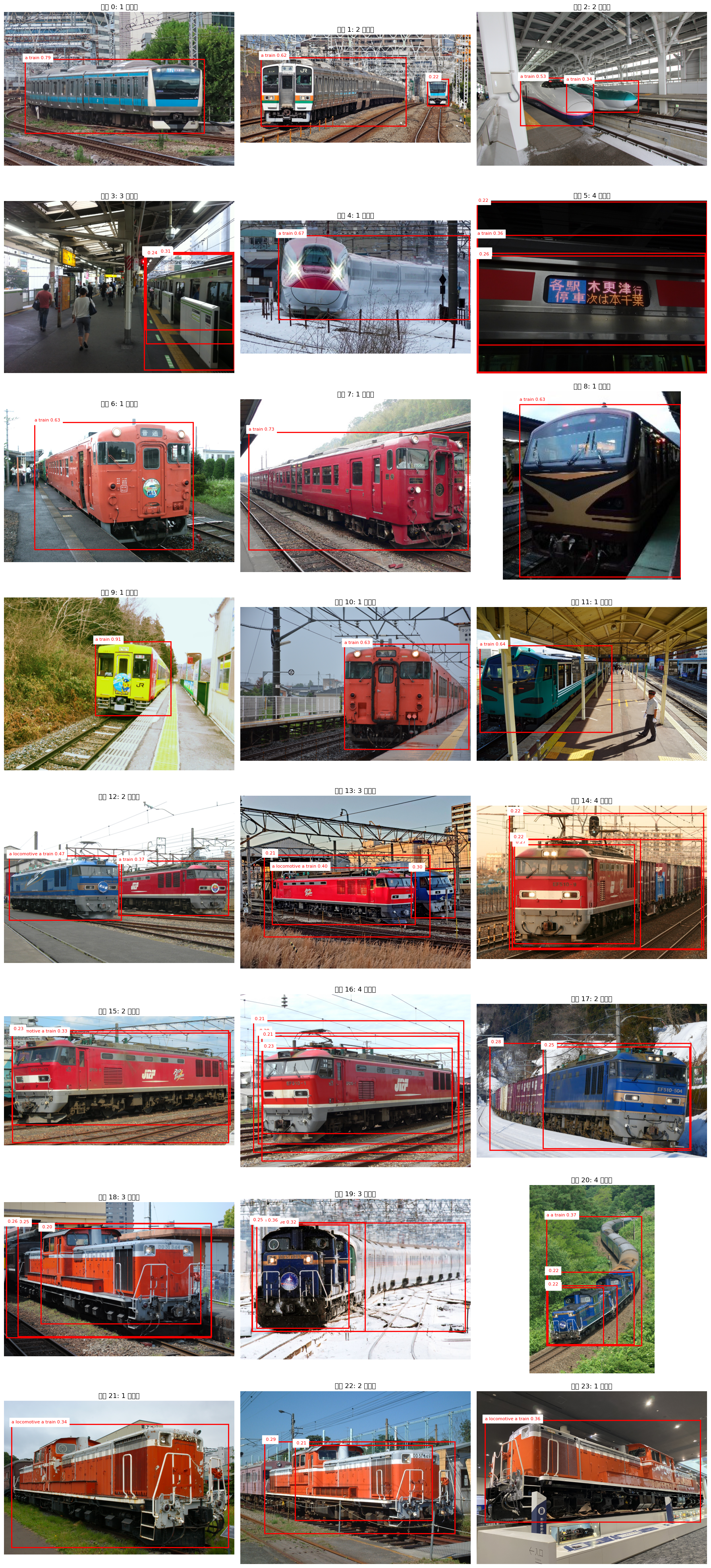
有了 power_type 后,Grounding DINO 的采样和 prompt 可以分流。今天的实验采用了一个简单写法:动车组、柴联车这类 multiple unit 使用 ["a train"],机车类使用 ["a locomotive", "a train"]。
当前 notebook 中为了快速实验,按采样拼接顺序写。后面正式/全量测试改为按标签匹配。
 1
 2
 3
 4
 5
 6
 7
 8
 9
10
11
12
13
14
15
16
17
18
| # 随机抽样几张图来看看判断多物体能力
SAMPLE_SIZE = 6
GDINO_BATCH_SIZE = 4
with sqlite3.connect(db_path) as conn:
# 直接多种类采样
df1 = pd.read_sql_query(f""" SELECT id, downloaded_path FROM images WHERE excluded = 0 AND download_status = 'downloaded' AND power_type = 'EMU' ORDER BY RANDOM() LIMIT {SAMPLE_SIZE}""", conn)
df2 = pd.read_sql_query(f""" SELECT id, downloaded_path FROM images WHERE excluded = 0 AND download_status = 'downloaded' AND power_type = 'DMU' ORDER BY RANDOM() LIMIT {SAMPLE_SIZE}""", conn)
df3 = pd.read_sql_query(f""" SELECT id, downloaded_path FROM images WHERE excluded = 0 AND download_status = 'downloaded' AND power_type = 'Electric Locomotive' ORDER BY RANDOM() LIMIT {SAMPLE_SIZE}""", conn)
df4 = pd.read_sql_query(f""" SELECT id, downloaded_path FROM images WHERE excluded = 0 AND download_status = 'downloaded' AND power_type = 'Diesel Locomotive' ORDER BY RANDOM() LIMIT {SAMPLE_SIZE}""", conn)
sample_images = pd.concat([df1, df2, df3, df4], ignore_index=True, axis=0)
paths = [os.path.join(PROJECT_ROOT, "data", p) for p in sample_images["downloaded_path"]]
# paths = ['/Users/yukun/projects/wakareeru/data/img/E233系/1f5c3f_Toyota Vehicle Center.jpg', "/Users/yukun/projects/wakareeru/data/img/EF510形/ca6c48_UetsuhonsenKomachiKoshuFreight.jpg",
# '/Users/yukun/projects/wakareeru/data/img/E231系/c5ea96_Ochanomizu Crossing 2020-03-17.jpg']
images = [Image.open(path) for path in paths]
text_labels = [["a train"]] * (len(images)//2) + [["a locomotive",'a train']] * (len(images) - len(images)//2) # 针对动车组和机车用不同的标签,分别侦测整列车和机车自己。
)
|
1
2
3
4
5
6
7
8
9
| def gdino_labels_for_power_type(power_type: str) -> list[str]:
if power_type in {"Electric Locomotive", "Diesel Locomotive", "Steam Locomotive"}:
return ["a locomotive", "a train"]
return ["a train"]
text_labels = [
gdino_labels_for_power_type(power_type)
for power_type in sample_images["power_type"]
]
|
这也是为什么 power_type 必须在图片入库时就存在,而不是等到后处理时临时查 CSV:后续 GDINO、裁图、主体选择、甚至多主体图过滤都会依赖这个字段。加上这个之后可以看看效果:
可以注意到对locomotive的分割起到了作用。为了表现对比参照我把"a train"这个label也放进去了。
Grounding DINO batch 推理的内存占用
今天还处理了一个 batch 相关的问题。GDINO看似0.2B其实极其吃内存/显存,处理小patch的时候粗略看python进程来到了19GB,一旦触发了swap那推理速度就直接血崩了。所以最开始为了节省内存,把 Grounding DINO 推理改成了:
1
2
3
4
5
| with torch.no_grad():
outputs = []
for i in range(0, len(images), 4):
inputs_batch = {k: v[i:i+4] for k, v in inputs.items()}
outputs.append(model(**inputs_batch))
|
但这样 outputs 变成了 list[GroundingDinoObjectDetectionOutput]。而 processor.post_process_grounded_object_detection(...) 需要的是单个 batch output 对象,它会访问:
1
2
| outputs.logits
outputs.pred_boxes
|
所以直接把 list 传进去会报:
1
| AttributeError: 'list' object has no attribute 'logits'
|
兼容的 batch 方案有两种。第一种是每个 batch 推理后立刻 postprocess,再 extend 到总结果。第二种更适合 notebook 实验:把推理结果缓存下来,postprocess 单独放到下一个 cell。这样调 threshold 和 text_threshold 时不需要重新跑模型。
当前采用的是第二种:
 1
 2
 3
 4
 5
 6
 7
 8
 9
10
11
12
13
14
15
16
| GDINO_BATCH_SIZE = 4
target_sizes = [img.size[::-1] for img in images]
gdino_batch_outputs = []
gdino_batch_input_ids = []
gdino_batch_target_sizes = []
with torch.no_grad():
for start in range(0, len(images), GDINO_BATCH_SIZE):
end = start + GDINO_BATCH_SIZE
inputs_batch = {k: v[start:end] for k, v in inputs.items()}
gdino_batch_outputs.append(model(**inputs_batch))
gdino_batch_input_ids.append(inputs_batch["input_ids"])
gdino_batch_target_sizes.append(target_sizes[start:end])
|
然后在下一个 cell 只做后处理和输出:
 1
 2
 3
 4
 5
 6
 7
 8
 9
10
11
12
13
14
15
16
17
| GDINO_BOX_THRESHOLD = 0.2
GDINO_TEXT_THRESHOLD = 0.3
results = []
for gdino_outputs, input_ids_batch, target_sizes_batch in zip(
gdino_batch_outputs,
gdino_batch_input_ids,
gdino_batch_target_sizes,
):
batch_results = processor.post_process_grounded_object_detection(
gdino_outputs,
input_ids_batch,
threshold=GDINO_BOX_THRESHOLD,
text_threshold=GDINO_TEXT_THRESHOLD,
target_sizes=target_sizes_batch,
)
results.extend(batch_results)
|
这里的两个 threshold 含义不同:
threshold 控制 bbox 置信度,越高越保守。text_threshold 控制检测框和文本 prompt 的匹配强度,越高越要求语义贴合。
对于当前任务,如果只是想先找到车体 bbox 给后续裁图,初始值可以偏召回,例如 0.15 / 0.25。如果想看更干净的可视化结果,再提高到 0.3 / 0.35。
Git 提交脉络
今天的实现可以从最近的提交记录中看到比较清晰的演化:
1
2
3
4
5
| 1b08c47 Add V2 filter: SigLIP2 Only Interior Filtering, EMU/Locomotive separated object detection
e94244d Add power_type field and mapping
b9c328f update power_type to DB
880e4ff update
e9ad493 Data Cleaning: Exclude Interior, LLM details detection, Grounding DINO multi target recognization
|
e9ad493 是 v1 清洗主线:规则与 LLM 过滤内饰/细节,LLM 从 category path 抽取车型细节,Grounding DINO 初步测试多主体识别。
b9c328f 和 e94244d 把 power_type 推进到数据层:先更新 CSV 和数据库,再在 crawler 中加入映射、schema migration、record 构建、upsert 和旧库修复 cell。
1b08c47 则是 v2 方向:新增 img_filter_v2.ipynb,把画面类型判断从 LLM 改成 SigLIP2;同时开始按 EMU/DMU/Locomotive 分组测试 Grounding DINO prompt。
技术路线因此变成:
 1
 2
 3
 4
 5
 6
 7
 8
 9
10
11
12
13
14
15
16
17
18
19
20
21
22
23
24
25
| Commons category / file manifest
|
|-- MIME 过滤,去掉非 image/*
|
v
SQLite images 表
|
|-- series/type -> power_type 规则映射
|-- 明显内饰关键词快速过滤
|
v
SigLIP2 zero-shot 画面类型分类
|
|-- interior
|-- exterior
|-- detailed exterior close-up
|
v
Grounding DINO bbox 检测
|
|-- EMU/DMU: ["a train"]
|-- Locomotive: ["a locomotive", "a train"]
|
v
后续:NMS、多主体图过滤、主体 bbox 选择、裁图与训练集构建
|
这个路线的核心取舍是:元数据问题用规则和 LLM,视觉问题用视觉模型。power_type 让后续的 bbox 生成可以按车辆动力类型选择不同的 prompt,增加了粒度。并且甚至可以在推理过程中用于zeroshot分流到动车组/机车识别。